Skip to article frontmatterSkip to article content
Site not loading correctly?

This may be due to an incorrect BASE_URL configuration. See the MyST Documentation for reference.

Lecture 3: The Fourier Transform

Signal Processing for Interactive Systems

Cumhur Erkut (cer@create.aau.dk)

Aalborg University Copenhagen.

Last edited: 2025-02-25

The discrete-time Fourier transform

In this part, you will learn

  • why it is important to look at signals in the frequency domain

  • what the DTFT is

  • how you can visualise noise removal in the frequency domain

🔈 Understanding the DFT and the FFT (20 minutes)

Example: analysing a trumpet signal Suppose that we record a trumpet signal sns_n for n=0,1,2,,N1n=0,1,2,\ldots,N-1.

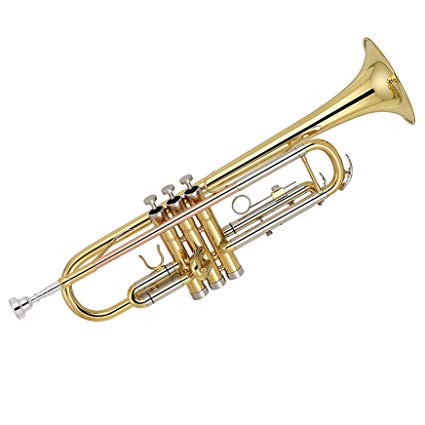
Trumpet
try:
  import google.colab
  IN_COLAB = True
  !mkdir -p data
  !wget https://raw.githubusercontent.com/SMC-AAU-CPH/med4-ap-jupyter/main/lecture7_Fourer_Transfom/data/trumpet.wav -P data
  !wget https://raw.githubusercontent.com/SMC-AAU-CPH/med4-ap-jupyter/main/lecture7_Fourer_Transfom/data/trumpetFull.wav -P data
except:
  IN_COLAB = False


# %matplotlib inline
import numpy as np
import matplotlib.pyplot as plt
import scipy.io.wavfile as wave
import IPython.display as ipd
import librosa

# If needed you can load the trumpet full audio file, and crop the beginning for a single note as trumpet.wav
# audio_data, sampling_rate = librosa.load(librosa.ex('trumpet'))
--2025-02-25 10:06:35--  https://raw.githubusercontent.com/SMC-AAU-CPH/med4-ap-jupyter/main/lecture7_Fourer_Transfom/data/trumpet.wav
Resolving raw.githubusercontent.com (raw.githubusercontent.com)... 185.199.108.133, 185.199.109.133, 185.199.110.133, ...
Connecting to raw.githubusercontent.com (raw.githubusercontent.com)|185.199.108.133|:443... connected.
HTTP request sent, awaiting response... 200 OK
Length: 160044 (156K) [audio/wav]
Saving to: ‘data/trumpet.wav’

trumpet.wav         100%[===================>] 156.29K  --.-KB/s    in 0.03s   

2025-02-25 10:06:35 (4.66 MB/s) - ‘data/trumpet.wav’ saved [160044/160044]

--2025-02-25 10:06:35--  https://raw.githubusercontent.com/SMC-AAU-CPH/med4-ap-jupyter/main/lecture7_Fourer_Transfom/data/trumpetFull.wav
Resolving raw.githubusercontent.com (raw.githubusercontent.com)... 185.199.108.133, 185.199.109.133, 185.199.110.133, ...
Connecting to raw.githubusercontent.com (raw.githubusercontent.com)|185.199.108.133|:443... connected.
HTTP request sent, awaiting response... 200 OK
Length: 832654 (813K) [audio/wav]
Saving to: ‘data/trumpetFull.wav’

trumpetFull.wav     100%[===================>] 813.14K  --.-KB/s    in 0.06s   

2025-02-25 10:06:35 (13.6 MB/s) - ‘data/trumpetFull.wav’ saved [832654/832654]

# load a trumpet signal
samplingFreq, cleanTrumpetSignal = wave.read('data/trumpet.wav')
cleanTrumpetSignal = cleanTrumpetSignal/2**15 # normalise
ipd.Audio(cleanTrumpetSignal, rate=samplingFreq)
Loading...
nData = np.size(cleanTrumpetSignal)
timeVector = np.arange(nData)/samplingFreq # seconds
plt.figure(figsize=(14,6))
plt.plot(timeVector,cleanTrumpetSignal,linewidth=2)
plt.xlim((timeVector[0],timeVector[-1]))
plt.xlabel('time [s]'), plt.ylabel('$s_n$');
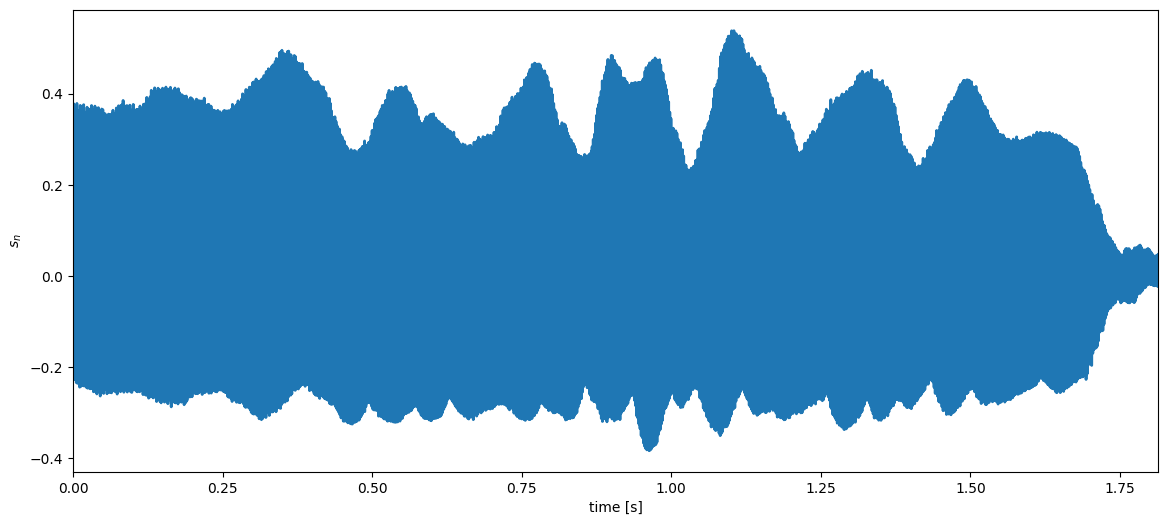
<Figure size 1400x600 with 1 Axes>

The discrete-time Fourier transform (DTFT)

Any colour can be written as a weighted combination of three atoms (red, green and blue colours).
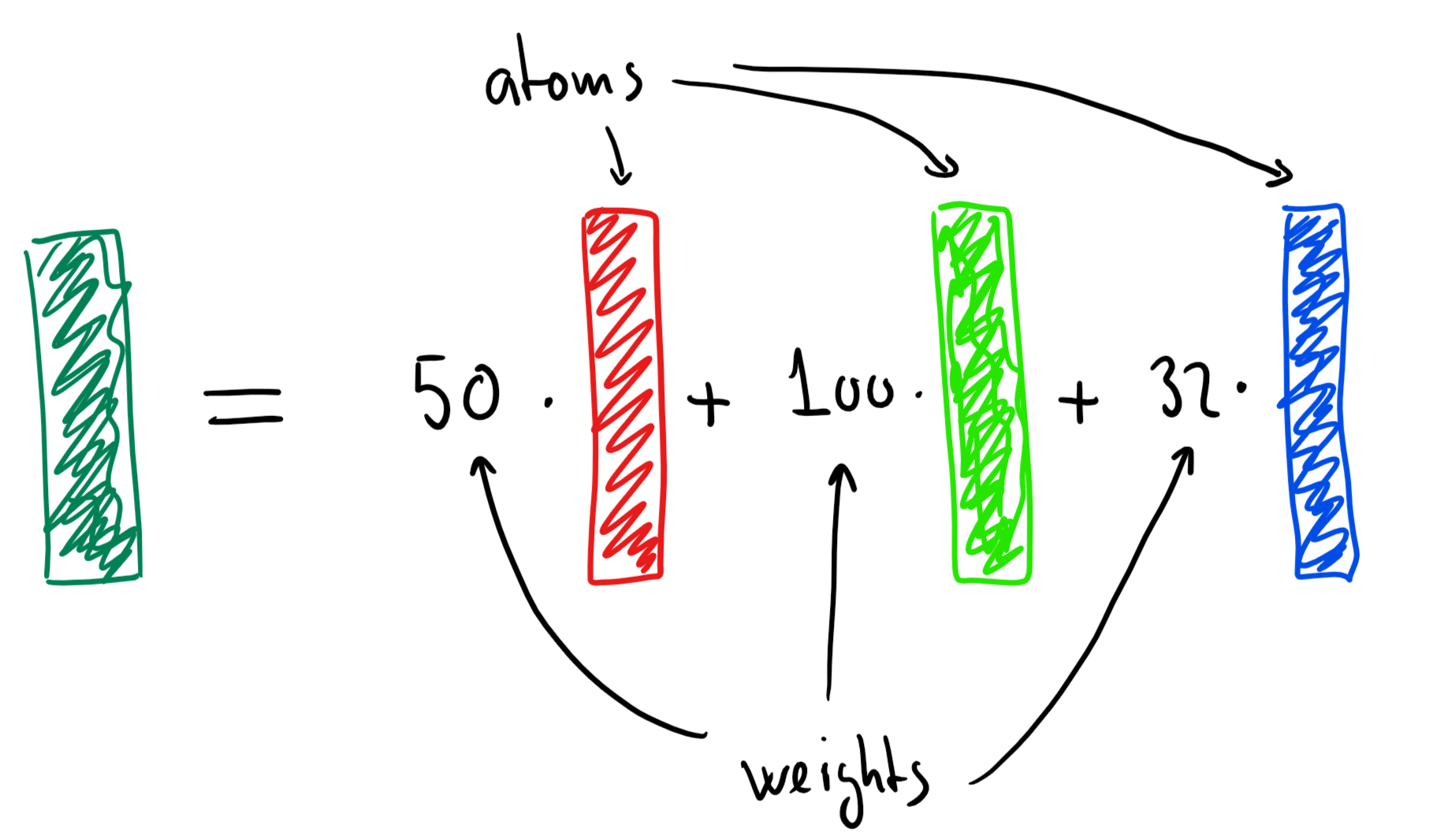
linear combination of colours

A signal (such as the trumpet signal) can be written as a weighted combination of phasors, i.e.,

sn=12πππS(ω)ejωndω .s_n = \frac{1}{2\pi}\int_{-\pi}^{\pi} S(\omega) \mathrm{e}^{j\omega n}d\omega\ .

This is called the inverse discrete-time Fourier transform (inverse DTFT).

We can find the weights S(ω)S(\omega) by correlating our signal to the phasor ejωn\mathrm{e}^{-j\omega n}, i.e.,

S(ω)=n=snejωn .S(\omega) = \sum_{n=-\infty}^{\infty} s_n \mathrm{e}^{-j\omega n}\ .

This is called discrete-time Fourier transform (DTFT).

Note that

  • the DTFT is mostly of theoretical interest since we will never encounter infinitely long signals in practice

  • the practical version of the DTFT is called the discrete Fourier transform (DFT) (more on this later)

Example: analysing a trumpet signal

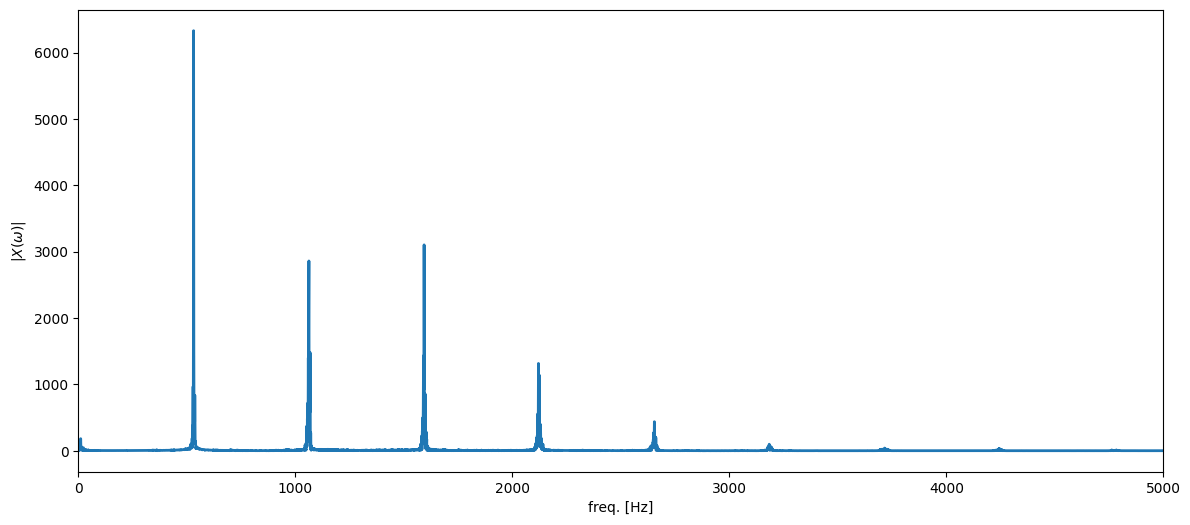
Let us now (pretend that we can actually) compute the DTFT of the trumpet signal, i.e.,

S(ω)=n=snejωn ,S(\omega) = \sum_{n=-\infty}^{\infty} s_n \mathrm{e}^{-j\omega n}\ ,

with sns_n being the trumpet signal. (In practice, we are computing the DFT, but we will return to that later).

Example: An EEG Signal (eyes closed)

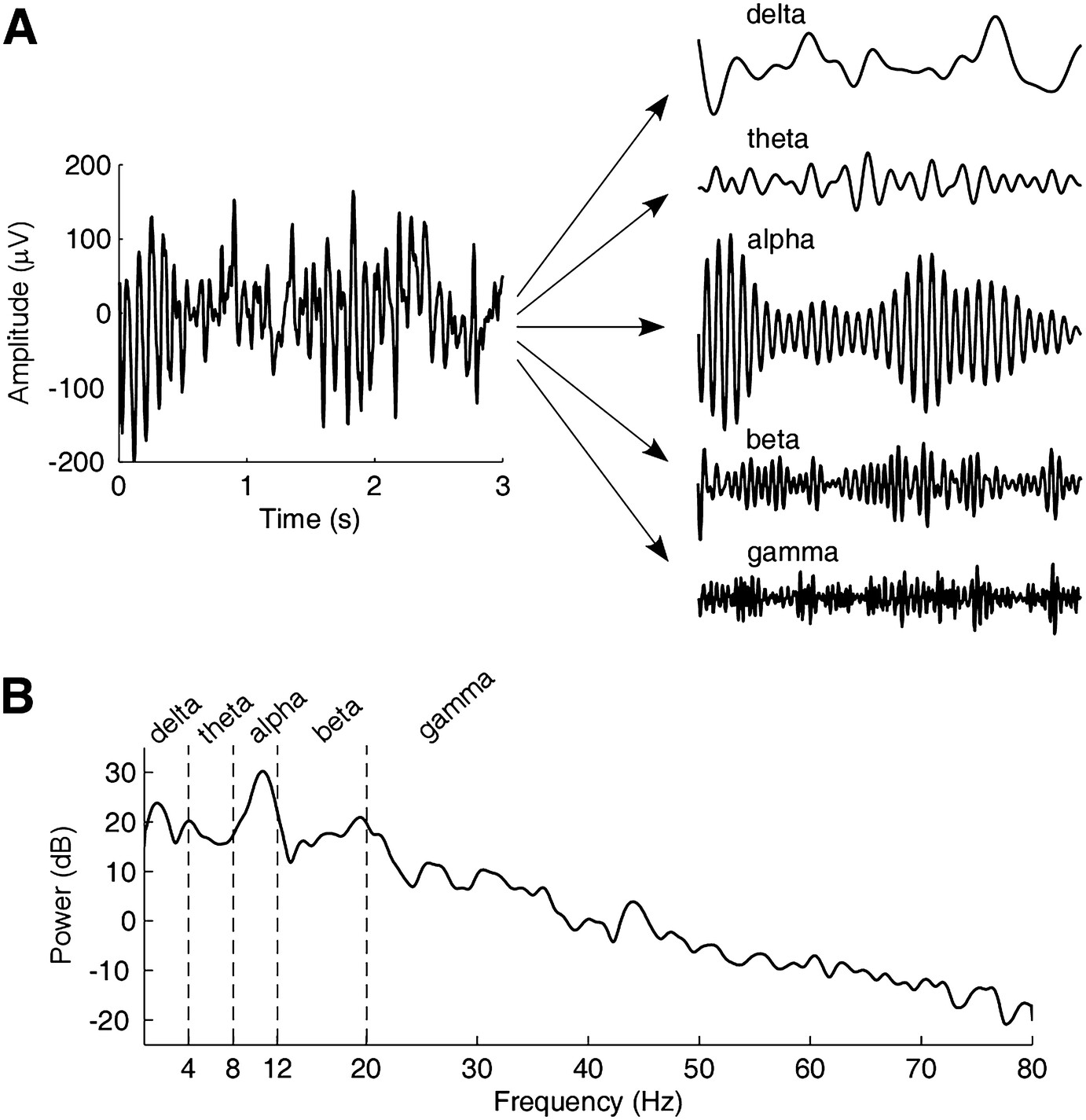
EEG signal and bands

Time-domain representation and frequency-domain representation (the spectrum) of anEEG signal with eyes closed. (a) The EEG signal is recorded at Oz and has a duration of 3 s and asampling rate of 160 Hz. By using bandpass filtering with difference cutoff frequencies, the signalcan be decomposed into five rhythms. (b) The spectrum of the EEG signal. After Zhang, Zhiguo. 2019. “Spectral and Time-Frequency Analysis,” in 89–116. doi:10.1007/978-981-13-9113-2_6. In “EEG Signal Processing and Feature Extraction”, edited by Li Hu and Zhiguo Zhang, 2019.

freqVector = np.arange(nData)*samplingFreq/nData # Hz
# we compute the DFT using an FFT algorithm
freqResponseClean = np.fft.fft(cleanTrumpetSignal)
ampSpectrumClean = np.abs(freqResponseClean)
plt.figure(figsize=(14,6))
plt.plot(freqVector,ampSpectrumClean,linewidth=2)
plt.xlim((0,5000)) # up to 5 KHz
plt.xlabel('freq. [Hz]'), plt.ylabel('$|X(\omega)|$');
<Figure size 1400x600 with 1 Axes>

Video example FFT (Live Code)

We match the live script code from 16:27 to the end in the video exactly with python.

video = ipd.YouTubeVideo('QmgJmh2I3Fw', width=900, height=600)  # Accelerometer MATLAB Example
# Display the bigger video
display(video)
Loading...
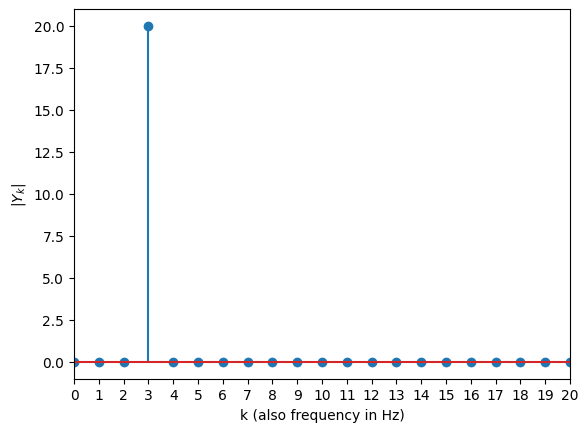
Sine Signal
fs = 40
T = 1/fs
N = 40
# create time index for 1 seconds of a signal
t = np.arange(N)*T
# assign 3 Hz as frequency. TODO make it changable with a slider
xn = np.sin(2*np.pi*3*t)
One-sided FFT
# One-sided FFT
Y = np.fft.fft(xn)
plt.figure
plt.stem(abs(Y))
# stem plot only up to half of Nyquist, make all integer ticks visible
plt.xticks(np.arange(0,N/2+1,1))
plt.xlim((0,N/2))
plt.xlabel('k (also frequency in Hz)'), plt.ylabel('$|Y_k|$')
plt.show()
# Note: we don't normalize to match the video, if we'd divide Y_3 to N/2 = 20, we would.
<Figure size 640x480 with 1 Axes>

Example: a noisy trumpet signal

Let us now assume that we record a noisy trumpet signal. We can write this as

xn=sn+enx_n = s_n + e_n

where

  • xnx_n is the noisy trumpet signal

  • sns_n is the clean (i.e., noise-free) trumpet signal

  • ene_n is the noise

# add noise to the trumpet signal
noise = np.sqrt(0.01)*np.random.randn(nData) # generate so-called white Gaussian noise (WGN)
noisyTrumpetSignal = cleanTrumpetSignal + noise
freqResponseNoisy = np.fft.fft(noisyTrumpetSignal)
ampSpectrumNoisy = np.abs(freqResponseNoisy)
ipd.Audio(noisyTrumpetSignal, rate=samplingFreq)
Loading...

In the frequency-domain, the noisy trumpet signal can be written as

X(ω)=n=xnejωn=n=(sn+en)ejωn=n=snejωn+n=enejωn=S(ω)+E(ω)\begin{align} X(\omega) &= \sum_{n=-\infty}^{\infty} x_n \mathrm{e}^{-j\omega n} = \sum_{n=-\infty}^{\infty} (s_n+e_n) \mathrm{e}^{-j\omega n}\\ &= \sum_{n=-\infty}^{\infty} s_n \mathrm{e}^{-j\omega n} + \sum_{n=-\infty}^{\infty} e_n \mathrm{e}^{-j\omega n}\\ &= S(\omega)+E(\omega) \end{align}

where

  • X(ω)X(\omega) is the DTFT of the noisy trumpet signal

  • S(ω)S(\omega) is the DTFT of the clean trumpet signal

  • E(ω)E(\omega) is the DTFT of the noise

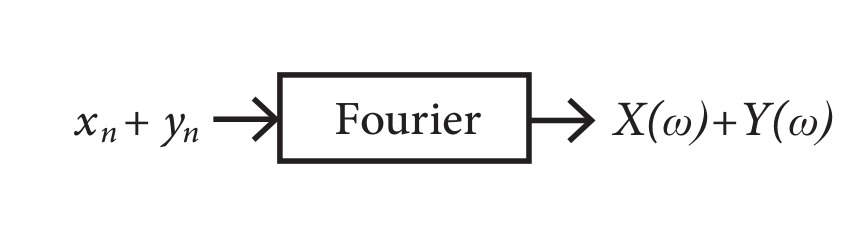
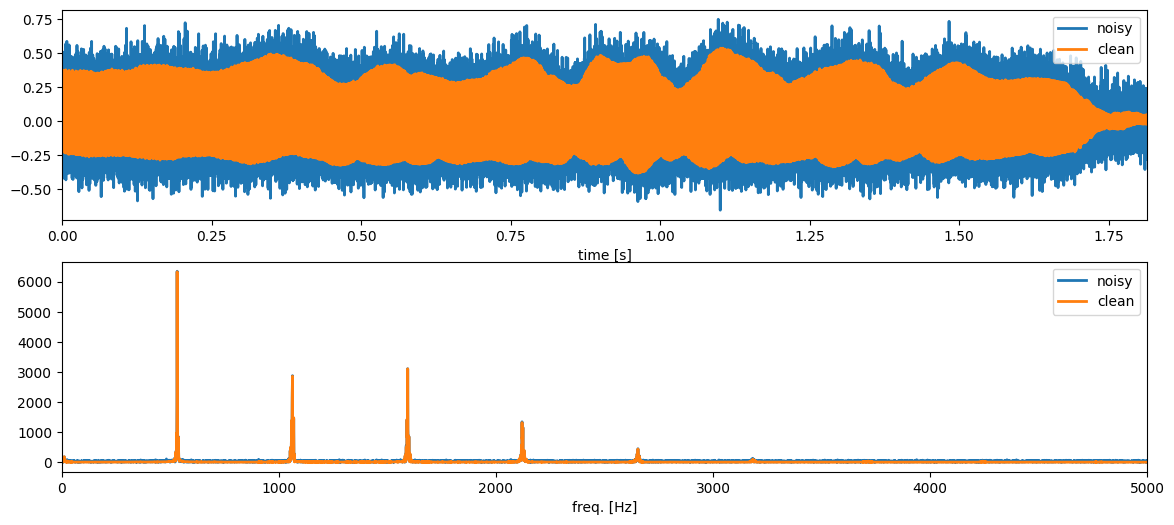
We see that the Fourier transform is additive. Thus, if we sum two signals in the time domain, we also sum them in the frequency domain. This is illustrated for the two signals xnx_n and yny_n in the figure below.

Additivity of the Fourier transform
plt.figure(figsize=(14,6))
plt.subplot(2,1,1)
plt.plot(timeVector,noisyTrumpetSignal,linewidth=2, label='noisy')
plt.plot(timeVector,cleanTrumpetSignal,linewidth=2, label='clean')
plt.xlim((timeVector[0],timeVector[-1])), plt.xlabel('time [s]'), plt.legend()
plt.subplot(2,1,2)
plt.plot(freqVector,ampSpectrumNoisy,linewidth=2, label='noisy')
plt.plot(freqVector,ampSpectrumClean,linewidth=2, label='clean')
plt.xlim((0,5000)), plt.xlabel('freq. [Hz]'), plt.legend();
<Figure size 1400x600 with 2 Axes>

Example task (SMC): removing noise from a trumpet signal

Note that

  • the trumpet signal only has almost all of its energy concentrated in a few frequencies at (approximately) 530 Hz, 1060 Hz, 1590 Hz, 2120 Hz, 2650 Hz, etc. (These values have been estimated using a pitch estimator which we are going to discuss in lecture 12)

  • the noise is spread across all frequencies

  • we can remove a lot of noise by using a filter which will only allow the ‘trumpet frequencies’ to pass through

  • a feedback comb filter can be designed to do exactly that!

Comb

A feedback comb filter has the difference equation

yn=xn+ayND .y_n = x_n + a y_{N-D}\ .

For a sampling frequency of fs=44,100f_\text{s} = 44,100 Hz and a pitch of f0=530Hzf_0 = 530 Hz, the pitch period is

fsf0=83.08 samples\frac{f_\text{s}}{f_0} = 83.08\ \text{samples}

Since DD has to be an integer, we will set D=83D=83 samples in the comb filter.

Comb filter structures

We will now remove the noise in the following way:

  1. Filter the noisy trumpet signal xnx_n through the feedback comb filter given by

    yn=xn+ayNDy_n = x_n + a y_{N-D}

    with D=83D=83 and aa close (but not exceeding) 1.

  2. The filter output yny_n should now be much more similar to the clean trumpet signal sns_n since the filter has removed a lot of noise.

# run a feedback comb filter to filter out the noise
def fbCombFiltering(noisySignal, delay, filterCoef):
    nData = np.size(noisySignal)
    filteredSignal = np.zeros(nData)
    for n in np.arange(nData):
        if n < delay:
            filteredSignal[n] = noisySignal[n]
        else:
            filteredSignal[n] = noisySignal[n]+filterCoef*filteredSignal[n-delay]
    return (1-filterCoef)*filteredSignal

pitchPeriod = 83 # samples (coarse estimate of the pitch period)
filterCoef = 0.98
filteredTrumpetSignal = fbCombFiltering(noisyTrumpetSignal, pitchPeriod, filterCoef)

plt.figure(figsize=(14,6))
plt.plot(timeVector,noisyTrumpetSignal,linewidth=2, label='noisy')
plt.plot(timeVector,cleanTrumpetSignal,linewidth=2, label='clean')
plt.plot(timeVector,filteredTrumpetSignal,linewidth=2, label='filtered')
plt.xlim((timeVector[0],timeVector[-1])), plt.xlabel('time [s]'), plt.legend()

ipd.Audio(filteredTrumpetSignal, rate=samplingFreq)
Loading...
<Figure size 1400x600 with 1 Axes>

Example: transfer function and frequency response of the feedback comb filter

In the last lecture, we saw that the transfer function of the feedback comb filter is

H(z)=11azD .H(z) = \frac{1}{1-az^{-D}}\ .

We can easily obtain the frequency response as the transfer function on the unit circle. That is, we set

z=ejωz = \mathrm{e}^{j\omega}

and obtain the frequency response of the comb filter to

H(ω)=11aejωD .H(\omega) = \frac{1}{1-a\mathrm{e}^{-j\omega D}}\ .
Comb
# compute the frequency response of the comb filter and normalise its maximum value
combFilterFreqResp = 1/(1-filterCoef*np.exp(-1j*(2*np.pi*freqVector/samplingFreq)*pitchPeriod))
combFilterFreqResp = (np.max(ampSpectrumClean)*(1-filterCoef))*combFilterFreqResp
plt.figure(figsize=(14,6))
plt.plot(freqVector,np.abs(combFilterFreqResp),linewidth=2, label='comb filter')
plt.plot(freqVector,ampSpectrumNoisy,linewidth=2, label='noisy')
plt.plot(freqVector,ampSpectrumClean,linewidth=2, label='clean')
plt.xlim((0,5000)), plt.xlabel('freq. [Hz]'), plt.legend();
<Figure size 1400x600 with 1 Axes>

Summary

  1. The discrete-time Fourier transform (DTFT) of a signal xnx_n is given by

    X(ω)=n=xnejωn .X(\omega) = \sum_{n=-\infty}^{\infty} x_n \mathrm{e}^{-j\omega n}\ .

    You can think of the DTFT as a correlation between a signal and a phasor of frequency ω\omega.

  2. The inverse DTFT of a frequency response X(ω)X(\omega) is given by

    xn=12πππX(ω)ejωndω .x_n = \frac{1}{2\pi}\int_{-\pi}^{\pi} X(\omega) \mathrm{e}^{j\omega n}d\omega\ .

    You can think of the inverse DTFT as writing the signal as a weighted sum of phasors.

  3. Signals are often much easier to process and analyse in the frequency domain.

Active 5 minutes break

Recall that an impulse is given by

δn={1n=00otherwise .\delta_n = \begin{cases} 1 & n=0\\ 0 & \text{otherwise} \end{cases}\ .
  1. Compute the frequency response of this impulse by computing the DTFT.

Assume that you pass the impulse through a filter (i.e., set xn=δnx_n=\delta_n) with difference equation

yn=xnxn2 .y_n = x_n - x_{n-2}\ .

2. What is the impulse response hnh_n of this filter? 3. Compute the frequency response of the filter by computing the DTFT of the impulse response.


The DTFT of a signal/impulse response xnx_n is given by

X(ω)=n=xnejωn .X(\omega) = \sum_{n=-\infty}^{\infty} x_n \mathrm{e}^{-j\omega n}\ .

Windowing

In this part, you will learn

  • what a window is

  • why we need them

  • how windows change the frequency response of a signal

  • different types of windows

The DTFT of a signal response xnx_n is given by

X(ω)=n=xnejωn .X(\omega) = \sum_{n=-\infty}^{\infty} x_n \mathrm{e}^{-j\omega n}\ .

Note that there are three practical problems with the DTFT

  1. we will never observe a signal xnx_n from -\infty to \infty

  2. the digital frequency ω\omega is a continuous parameter so we cannot store X(ω)X(\omega) on a computer

  3. the frequency content of most signals change as a function of time

We solve these problems using

  1. windows to turn infinite signals into a finite number of non-zero samples (this block)

  2. sample the DTFT on a uniform grid of frequencies (this is called the discrete Fourier transform (DFT)) (next block)

  3. slide a window across a long signal to compute a short-time Fourier transform (STFT) (last block)

The rectangular window

Let us first look at the rectangular window

wn={1n=0,1,,N10otherwise .w_n = \begin{cases} 1 & n=0,1,\ldots, N-1\\ 0 & \text{otherwise} \end{cases}\ .
Sketch of rectangular window

We can think of the rectangular window wnw_n as a way of extracting the samples we see from an infinitely long signal xnx_n, i.e.,

wnxnfor n=,, .w_nx_n \quad\text{for } n=-\infty,\ldots,\infty\ .
Sketch of windowed signal

Example: DTFT of a window phasor

Let us look at the phasor

xn=ejω0n x_n = \mathrm{e}^{j\omega_0 n}

which we observe for n=0,1,,N1n=0,1,\ldots,N-1.

The DTFT of this windowed phasor is (note that subscript NN in XN(ω)X_N(\omega) indicates the window length)

XN(ω)=n=(wnxn)ejωn=n=(wnejω0n)ejωn=n=0N1ejω0nejωn=n=0N1ej(ωω0)n=1ej(ωω0)N1ej(ωω0)\begin{align} X_N(\omega) &= \sum_{n=-\infty}^\infty (w_nx_n) \mathrm{e}^{-j\omega n} = \sum_{n=-\infty}^\infty (w_n\mathrm{e}^{j\omega_0 n}) \mathrm{e}^{-j\omega n}\\ &= \sum_{n=0}^{N-1} \mathrm{e}^{j\omega_0 n} \mathrm{e}^{-j\omega n} = \sum_{n=0}^{N-1}\mathrm{e}^{-j(\omega-\omega_0) n}\\ &= \frac{1-\mathrm{e}^{-j(\omega-\omega_0)N}}{1-\mathrm{e}^{-j(\omega-\omega_0)}} \end{align}

where the last equality follows from the geometric series.

# %matplotlib inline
import numpy as np
import matplotlib.pyplot as plt

def computeDtftShiftedRectWindow(windowLength, freqShift):
    '''Compute the DTFT of a modulated rectangular window'''
    nFreqs = 100*windowLength
    freqGrid = 2*np.pi*np.arange(nFreqs)/nFreqs-np.pi
    complexNumber = np.exp(1j*(freqGrid-freqShift))
    numerator = 1-complexNumber**windowLength
    denominator = 1-complexNumber
    dtftShiftedRectWindow = np.zeros(nFreqs,dtype=complex)
    for ii in np.arange(nFreqs):
        if denominator[ii] == 0:
            # Using L'Hospital's rule, it can be shown that the DTFT is N when the dominator is 0
            dtftShiftedRectWindow[ii] = windowLength
        else:
            dtftShiftedRectWindow[ii] = numerator[ii]/denominator[ii]
    return dtftShiftedRectWindow, freqGrid
windowLength = 10
signalFreq = 0.7 # rad/sample
windowedDtft, freqGrid = computeDtftShiftedRectWindow(windowLength, signalFreq)

plt.figure(figsize=(14,6))
plt.plot(freqGrid,np.abs(windowedDtft), label='$|X_N(\omega)|$')
plt.plot(np.array([signalFreq,signalFreq]),np.array([0,windowLength]), '--', label='$\omega_0$')
plt.xlim((freqGrid[0], freqGrid[-1])), plt.ylim((0,windowLength)), plt.legend();
<Figure size 1400x600 with 1 Axes>

The windowed DTFT was

XN(ω)=1ej(ωω0)N1ej(ωω0) .X_N(\omega) = \frac{1-\mathrm{e}^{-j(\omega-\omega_0)N}}{1-\mathrm{e}^{-j(\omega-\omega_0)}}\ .

Note that

  1. if we set w0=0w_0 = 0, then xn=1x_n=1 and we obtain the DTFT of only the window, i.e.,

    WN(ω)=1ejωN1ejωW_N(\omega) = \frac{1-\mathrm{e}^{-j\omega N}}{1-\mathrm{e}^{-j\omega}}
rectWindowDtft,_ = computeDtftShiftedRectWindow(windowLength, 0)

plt.figure(figsize=(14,6))
plt.plot(freqGrid,np.abs(windowedDtft), label='$|X_N(\omega)|$')
plt.plot(np.array([signalFreq,signalFreq]),np.array([0,windowLength]), '--', label='$\omega_0$')
plt.plot(freqGrid,np.abs(rectWindowDtft), label='$|W_N(\omega)|$')
plt.xlim((freqGrid[0], freqGrid[-1])), plt.ylim((0,windowLength)), plt.legend();
<Figure size 1400x600 with 1 Axes>
  1. the DTFT XN(ω)X_N(\omega) of the windowed phasor is simply a frequency shifted version of W(ω)W(\omega), i.e.,

    XN(ω)=WN(ωω0) .X_N(\omega) = W_N(\omega-\omega_0)\ .

    This is also called the modulation property of the DTFT.

  1. if we let NN\to\infty, it can be shown that

    limNXN(ω)=X(ω)={ω=ω00otherwise .\lim_{N\to\infty}X_N(\omega) =X(\omega) = \begin{cases} \infty & \omega = \omega_0\\ 0 & \text{otherwise} \end{cases}\ .

    Thus, the DTFT X(ω)X(\omega) of a phasor of infinite duration has an infinite peak at ω0\omega_0 and is zero otherwise.

windowLength = 10
windowedDtftN, freqGridN = computeDtftShiftedRectWindow(windowLength, signalFreq)

plt.figure(figsize=(14,6))
plt.plot(freqGridN,np.abs(windowedDtftN), label='$|X_N(\omega)|$')
plt.plot(np.array([signalFreq,signalFreq]),np.array([0,windowLength]), '--', linewidth=2, label='$\omega_0$')
plt.xlim((freqGridN[0], freqGridN[-1])), plt.ylim((0,windowLength)), plt.legend();
<Figure size 1400x600 with 1 Axes>

Windowing and its influence of the DTFT

Assume that we observe NN samples of a signal xnx_n with DTFT X(ω)X(\omega). How is the DTFT XN(ω)X_N(\omega) of the windowed signal related to X(ω)X(\omega)? We know that the windowed DTFT and the inverse DTFT are given by

XN(ω)=n=wnxnejωn=n=0N1xnejωnxn=12πππX(ω~)ejω~ndω~\begin{align} X_N(\omega) &= \sum_{n=-\infty}^\infty w_nx_n\mathrm{e}^{-j\omega n} = \sum_{n=0}^{N-1} x_n\mathrm{e}^{-j\omega n}\\ x_n &= \frac{1}{2\pi}\int_{-\pi}^\pi X(\tilde{\omega})\mathrm{e}^{j\tilde{\omega} n}d\tilde{\omega} \end{align}

where we have added a ~\tilde{\cdot} on top of ω\omega in the last equation to indicate that it is an integration variable.

Inserting the last equation into the first results in

XN(ω)=12πππX(ω~)[n=0N1ejω~nejωn]dω~=12πππX(ω~)W(ωω~)dω~X_N(\omega) = \frac{1}{2\pi}\int_{-\pi}^\pi X(\tilde{\omega})\left[\sum_{n=0}^{N-1} \mathrm{e}^{j\tilde{\omega} n}\mathrm{e}^{-j\omega n}\right]d\tilde{\omega} = \frac{1}{2\pi}\int_{-\pi}^\pi X(\tilde{\omega})W(\omega-\tilde{\omega})d\tilde{\omega}

which is a convolution between X(ω)X(\omega) and the DTFT W(ω)W(\omega) of the rectangular window.

video = ipd.YouTubeVideo('KuXjwB4LzSA')  # If you need a refresher, here is GREAT CONVOLUTION VIDE FROM 3BLUE1BROWN
# Display the video
display(video)
Loading...

Note that applying a window is equivalent to low-pass filtering the DTFT X(ω)X(\omega). This causes frequency smearing!

Frequency smearing of windows
windowLength = 10
signalFreqA = 0.2 # rad/sample
signalFreqB = 1.3 # rad/sample
windowedDtftA, freqGrid = computeDtftShiftedRectWindow(windowLength, signalFreqA)
windowedDtftB, _ = computeDtftShiftedRectWindow(windowLength, signalFreqB)
windowedDtft = windowedDtftA+windowedDtftB

plt.figure(figsize=(14,6))
plt.plot(freqGrid,np.abs(windowedDtft), linewidth=2, label='$|X_N(\omega)|$')
plt.plot(np.array([signalFreqA,signalFreqA]),np.array([0,np.max(np.abs(windowedDtft))]), '--', linewidth=2, label='$\omega_A$')
plt.plot(np.array([signalFreqB,signalFreqB]),np.array([0,np.max(np.abs(windowedDtft))]), '--', linewidth=2, label='$\omega_B$')
plt.xlim((freqGridN[0], freqGridN[-1])), plt.ylim((0,np.max(np.abs(windowedDtft)))), plt.legend();
<Figure size 1400x600 with 1 Axes>

Bandwidth and sidelobes of windows

Ideally, we would like a window with

  • narrow bandwidth to minimise frequency smearing

  • high sidelobe attenuation to minimise spectal leakage

Unfortunately, decreasing the bandwidth increases the sidelobes and vice versa for a fixed NN.

Window properties

As no perfect window exists, many windows have been suggested. Note that

  • the windows have different trade-offs between bandwidth and sidelobe attenuation

  • examples of popular windows are rectangular, sine, Hamming, Hanning, Kaiser, and Gaussian. As an example, the hanning window is given by

    wn={0.50.5cos(2πn/(N1))n=0,1,,N10otherwise .w_n = \begin{cases} 0.5-0.5\cos(2\pi n/(N-1)) & n = 0, 1, \ldots, N-1\\ 0 & \text{otherwise}\ . \end{cases}
  • the rectangular window has the smallest bandwidth and the lowest sidelobe attenuation

  • increasing the window length NN decreases the bandwidth and increases the sidelobe attenuation.

# %matplotlib inline
import numpy as np
import matplotlib.pyplot as plt

windowLength = 10
samplingIndices = np.arange(windowLength)
rectWindow = np.ones(windowLength)
hanningWindow = np.hanning(windowLength)
hammingWindow = np.hamming(windowLength)

nDft = 1000
freqGrid = 2*np.pi*np.arange(nDft)/nDft-np.pi
dtftRectWindow = np.fft.fftshift(np.fft.fft(rectWindow,nDft))
dtftHanningWindow = np.fft.fftshift(np.fft.fft(hanningWindow,nDft))
dtftHammingWindow = np.fft.fftshift(np.fft.fft(hammingWindow,nDft))
plt.figure(figsize=(14,6))
plt.plot(samplingIndices,rectWindow,'o-',linewidth=2, label='Rectangular')
plt.plot(samplingIndices,hanningWindow,'o-', linewidth=2, label='Hanning')
plt.plot(samplingIndices,hammingWindow,'o-', linewidth=2, label='Hamming')
plt.xlim((samplingIndices[0],samplingIndices[-1])), plt.ylim((0,1.1)), plt.legend();
<Figure size 1400x600 with 1 Axes>
plt.figure(figsize=(14,6))
plt.plot(freqGrid,np.abs(dtftRectWindow), linewidth=2, label='Rectangular')
plt.plot(freqGrid,np.abs(dtftHanningWindow), linewidth=2, label='Hanning')
plt.plot(freqGrid,np.abs(dtftHammingWindow), linewidth=2, label='Hamming')
plt.xlim((freqGrid[0],freqGrid[-1])), plt.ylim((0,windowLength)),plt.legend();
<Figure size 1400x600 with 1 Axes>

Summary

  1. A window is used to extract a portion of a signal.

  2. If we extract the NN samples n=0,1,,N1n=0,1,\ldots,N-1, the windowed DTFT is

    XN(ω)=n=wnxnejωn=n=0N1wnxnejωnX_N(\omega) = \sum_{n=-\infty}^{\infty} w_n x_n \mathrm{e}^{-j\omega n} = \sum_{n=0}^{N-1} w_n x_n \mathrm{e}^{-j\omega n}
  3. Windowing a signal introduces frequency smearing and leakage, and these decrease as the window length increases

  4. Many differenct windows exist and they trade-off the bandwidth for the sidelobe attenuation in different ways.

The discrete Fourier transform and Spectrograms

In the next 20 minutes, you will learn

  • how the DFT is defined

  • how the DFT is related to the DTFT

  • what the short-time Fourier transform (STFT) is

  • what the spectrogram is

The discrete Fourier transform

The discrete Fourier transform (DFT) is a sampled version of the windowed DTFT, i.e.,

XN(ωf)=n=0N1xnejωfnX_N(\omega_f) = \sum_{n=0}^{N-1} x_n \mathrm{e}^{-j\omega_f n}

where the digital frequencies are evaluated on a FF-point grid given by

ωf=2πf/Ffor f=0,1,,F1\omega_f = 2\pi f/F\qquad\text{for }f=0,1,\ldots,F-1

with FNF\geq N.


Note that we have here assumed a rectangular window, but other windows can be used as well.

Often, the expression for ωf\omega_f is inserted directly into the DFT definition and we obtain

XN(ωf)=n=0N1xnej2πnf/F .X_N(\omega_f) = \sum_{n=0}^{N-1} x_n \mathrm{e}^{-j2\pi n f/F}\ .
# %matplotlib inline
import numpy as np
import matplotlib.pyplot as plt

windowLength = 10
signalFreq = 0.3 # radians/sample
signal = np.cos(signalFreq*np.arange(windowLength))
nFreqsDtft = 2500
freqGridDtft = 2*np.pi*np.arange(nFreqsDtft)/nFreqsDtft-np.pi
windowedDtftSignal = np.fft.fftshift(np.fft.fft(signal,nFreqsDtft))
nFreqsDft = 26
freqGridDft = 2*np.pi*np.arange(nFreqsDft)/nFreqsDft-np.pi
dftSignal = np.fft.fftshift(np.fft.fft(signal,nFreqsDft))
plt.figure(figsize=(14,6))
plt.plot(freqGridDtft,np.abs(windowedDtftSignal), linewidth=2, label='windowed DTFT');
plt.plot(freqGridDft,np.abs(dftSignal), 'o', linewidth=2, label='DFT')
plt.xlim((freqGridDtft[0],freqGridDtft[-1])), plt.ylim((0,np.max(np.abs(windowedDtftSignal)))),plt.legend();
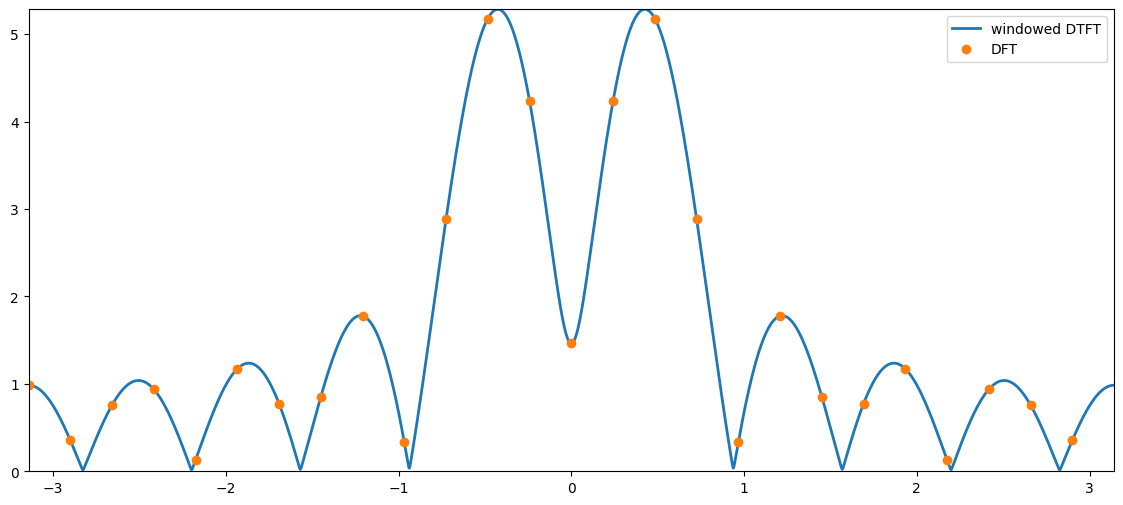
<Figure size 1400x600 with 1 Axes>

The inverse DFT

Recall that the inverse DTFT is given by

xn=12πππX(ω)ejωndω .x_n = \frac{1}{2\pi}\int_{-\pi}^{\pi} X(\omega) \mathrm{e}^{j\omega n}d\omega\ .

The inverse DFT is given by

xn=1Ff=0F1X(ωf)ejωfnx_n = \frac{1}{F}\sum_{f=0}^{F-1} X(\omega_f) \mathrm{e}^{j\omega_f n}

where ωf=2πf/F\omega_f=2\pi f/F.

The fast Fourier transform

The fast Fourier transform (FFT) computes the DFT, but is a computationally efficient way.

Note that

  • computing the DFT directly from its definition costs in the order of F2F^2 floating point (flops) operations (we write this as O(F2)\mathcal{O}(F^2)).

  • computing the DFT using an FFT algorithm reduces the cost to just O(Flog2F)\mathcal{O}(F\log_2 F) flops

  • most FFT algorithms are working most efficiently when log2(F)\log_2(F) is an integer

  • most FFT algorithms are slow (relatively speaking) if FF is prime or has large prime factors (i.e., if you factorise FF into a product of prime numbers and any of these are large, then most FFT algorithms will be slow)

  • entire books have been written on FFT algorithms, but the most important thing to remember is that they are all just different ways of compute the DFT as fast as possible!

The short-time Fourier transform (STFT)

In most practical signals, the frequency content changes as a function of time.

Spectrogram sketch

Assume that we have a long signal xnx_n and a much shorter window wnw_n of length NN which is zero everywhere, except for n=0,1,...,N1n=0,1,...,N-1.

To analyse the signal, we slide it relative to the window. Mathematically, we can slide the signal by considering

xn+lLx_{n+lL}

for different ll where

  • ll is the frame index

  • LL is the hop size.

Frame hop sketch

If we combine this with a window of length NN, we obtain the STFT to

XN(ωf,l)=n=wnxn+lLejωfn=n=0N1(wnxn+lL)ejωfnX_N(\omega_f, l) = \sum_{n=-\infty}^\infty w_n x_{n+lL} \mathrm{e}^{-j\omega_fn} = \sum_{n=0}^{N-1} (w_nx_{n+lL}) \mathrm{e}^{-j\omega_fn}

which can be computed using the DFT.

Thus,

  • the STFT is simply a collection of DFTs computed at different positions of the signal

  • the samples we see through the window at a given position is called a frame or a segment and is indexed by the frame index ll

  • unlike the DFT which only depends on the frequency index ff, the STFT also depends on the frame index ll

The spectrogram

The spectrogram Sx(ωf,l)S_x(\omega_f,l) is the squared amplitude response of the STFT, i.e.,

Sx(ωf,l)=XN(ωf,l)2 .S_\text{x}(\omega_f,l) = |X_N(\omega_f, l)|^2\ .

The spectrogram is used everywhere to visualise the frequency content as a function of time!

# %matplotlib inline
import numpy as np
import matplotlib.pyplot as plt
import scipy.signal as sig
import scipy.io.wavfile as wave
import IPython.display as ipd

def limitDynamicRange(spectrogram, maxRangeDb):
    minVal = np.max(spectrogram)*10**(-maxRangeDb/10)
    # set all values below minVal to minVal
    spectrogram[spectrogram < minVal] = minVal
    return spectrogram

# load a trumpet signal
samplingFreq, trumpetSignal = wave.read('data/trumpetFull.wav')
trumpetSignal = trumpetSignal/2**15 # normalise
ipd.Audio(trumpetSignal, rate=samplingFreq)
Loading...
frameLength = int(np.round(0.05*samplingFreq)) # samples
hopSize = 0.75*frameLength # samples
nDft = 2**13
maxDynamicRange = 80 # dB
freqVector, timeVector, specgram = sig.spectrogram(trumpetSignal, \
    fs=samplingFreq, window=np.hanning(frameLength), nperseg=frameLength, noverlap=hopSize, nfft=nDft)
plt.figure(figsize=(14,6))
plt.pcolormesh(timeVector, freqVector, 10*np.log10(limitDynamicRange(specgram, maxDynamicRange)), cmap='jet')
plt.xlabel('Time [sec]'), plt.ylabel('Frequency [Hz]')
plt.colorbar(), plt.xlim((0,timeVector[-1])), plt.ylim((0,10000));
ipd.Audio(trumpetSignal, rate=samplingFreq)
Loading...
<Figure size 1400x600 with 2 Axes>

Summary

  1. The discrete Fourier transform (DFT) is a sampled version of the windowed DTFT, i.e.,

    XN(ωf)=n=0N1xnejωfnX_N(\omega_f) = \sum_{n=0}^{N-1} x_n \mathrm{e}^{-j\omega_f n}

    where ωf=2πf/F\omega_f = 2\pi f/F for f=0,1,,F1f=0,1,\ldots,F-1 with FNF\geq N.

  2. The DFT can be computed efficiently using an FFT algorithm.

  3. The short-time Fourier transform (STFT) is the DFT of different frames of the signal, i.e.,

    XN(ωf,l)=n=0N1(wnxn+lL)ejωfnX_N(\omega_f, l) = \sum_{n=0}^{N-1} (w_nx_{n+lL}) \mathrm{e}^{-j\omega_fn}

    where ll is the frame index and LL the hop size.

  4. The spectrogram is the squared amplitude response of the STFT.

Exercise SMC: Obtain the same STFT using librosa.

# @title Solution (unhide if get stuck)
# calculate the STFT of the trumpet signal using librosa
import librosa

D = librosa.stft(trumpetSignal)  # STFT of y
S_db = librosa.amplitude_to_db(np.abs(D), ref=np.max)

plt.figure(figsize=(14,6))
# Change y axis up to 10kHz
plt.ylim(0,10000)
librosa.display.specshow(S_db, sr=samplingFreq, x_axis='time', y_axis='linear',cmap='jet')
plt.colorbar()

Exercise MED: Obtain a time-frewquency analysis of an EEG signal

https://mne.tools/stable/auto_tutorials/intro/10_overview.html#time-frequency-analysis

# @title Solution (unhide if get stuck)
# calculate the STFT of the trumpet signal using librosa
!pip install mne --quiet
import numpy as np
import mne
sample_data_folder = mne.datasets.sample.data_path()
sample_data_raw_file = (
    sample_data_folder / "MEG" / "sample" / "sample_audvis_filt-0-40_raw.fif"
)
raw = mne.io.read_raw_fif(sample_data_raw_file)

# print(raw)
# print(raw.info)

raw.compute_psd(fmax=50).plot(picks="data", exclude="bads", amplitude=False)
raw.plot(duration=5, n_channels=30)
Epoching continuous data and time-frequency analysis

The Raw object and the events array are the bare minimum needed to create an Epochs object, which we create with the Epochs class constructor. Here we’ll also specify some data quality constraints: we’ll reject any epoch where peak-to-peak signal amplitude is beyond reasonable limits for that channel type. This is done with a rejection dictionary; you may include or omit thresholds for any of the channel types present in your data. The values given here are reasonable for this particular dataset, but may need to be adapted for different hardware or recording conditions. For a more automated approach, consider using the autoreject package.

reject_criteria = dict(
    mag=4000e-15,  # 4000 fT
    grad=4000e-13,  # 4000 fT/cm
    eeg=150e-6,  # 150 µV
    eog=250e-6,
)  # 250 µV
events = mne.find_events(raw, stim_channel="STI 014")
event_dict = {
    "auditory/left": 1,
    "auditory/right": 2,
    "visual/left": 3,
    "visual/right": 4,
    "smiley": 5,
    "buttonpress": 32,
}

epochs = mne.Epochs(
    raw,
    events,
    event_id=event_dict,
    tmin=-0.2,
    tmax=0.5,
    reject=reject_criteria,
    preload=True,
)
319 events found on stim channel STI 014
Event IDs: [ 1  2  3  4  5 32]
Not setting metadata
319 matching events found
Setting baseline interval to [-0.19979521315838786, 0.0] s
Applying baseline correction (mode: mean)
Created an SSP operator (subspace dimension = 4)
4 projection items activated
Loading data for 319 events and 106 original time points ...
    Rejecting  epoch based on EEG : ['EEG 001', 'EEG 002', 'EEG 003', 'EEG 007']
    Rejecting  epoch based on EOG : ['EOG 061']
    Rejecting  epoch based on MAG : ['MEG 1711']
    Rejecting  epoch based on EOG : ['EOG 061']
    Rejecting  epoch based on EOG : ['EOG 061']
    Rejecting  epoch based on MAG : ['MEG 1711']
    Rejecting  epoch based on EEG : ['EEG 008']
    Rejecting  epoch based on EOG : ['EOG 061']
    Rejecting  epoch based on EOG : ['EOG 061']
    Rejecting  epoch based on EOG : ['EOG 061']
10 bad epochs dropped
conds_we_care_about = ["auditory/left", "auditory/right", "visual/left", "visual/right"]
epochs.equalize_event_counts(conds_we_care_about)  # this operates in-place
aud_epochs = epochs["auditory"]
vis_epochs = epochs["visual"]
del raw, epochs  # free up memory
Dropped 7 epochs: 121, 195, 258, 271, 273, 274, 275
aud_epochs.plot_image(picks=["MEG 1332", "EEG 021"])
Not setting metadata
136 matching events found
No baseline correction applied
0 projection items activated
Not setting metadata
136 matching events found
No baseline correction applied
0 projection items activated
<Figure size 640x480 with 4 Axes>
[<Figure size 640x480 with 4 Axes>, <Figure size 640x480 with 4 Axes>]
# Time-frequency
frequencies = np.arange(7, 30, 3)
power = aud_epochs.compute_tfr(
    "morlet", n_cycles=2, return_itc=False, freqs=frequencies, decim=3, average=True
)
power.plot(["MEG 1332"])
[Parallel(n_jobs=1)]: Done  17 tasks      | elapsed:    0.8s
[Parallel(n_jobs=1)]: Done  71 tasks      | elapsed:    2.6s
[Parallel(n_jobs=1)]: Done 161 tasks      | elapsed:    5.2s
[Parallel(n_jobs=1)]: Done 287 tasks      | elapsed:    8.8s
No baseline correction applied
<Figure size 640x480 with 2 Axes>
[<Figure size 640x480 with 2 Axes>]